cost of goods sold

Why Your Business Central Inventory Is Correct, but Your Reports Are Wrong

Why Your Business Central Inventory Is Correct, but Your Reports Are Wrong 

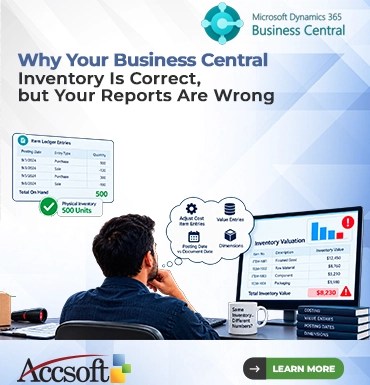
Has it ever happened to you that you have been sitting in front of your Microsoft Dynamics 365 Business Central screen, scratching your head? Your Item Ledger Entries are showing precisely 500 units of an item. Your physical inventory count is 100% accurate too. However, when you generate your financial report or even access your Power BI dashboards, your inventory is entirely wrong. You fee the system is lying. How is it possible that your inventory is spot on while your reports are just completely wrong?  It’s an irritating situation, but it happens quite frequently. What normally messes up is not the physical inventory but the process of costing, timing, and data relationships in Business Central. Here is the list of the most common mistakes.  “Adjust Cost – Item Entries” Batch Job  Initially, Business Central does not immediately account for the financial valuation of items when they are either received or shipped. Based on your cost flow method be it FIFO, LIFO, Average, or Standard. BC calculated the actual cost of goods sold asynchronously. If the “Adjust Cost – Item Entries” batch job doesn’t complete, there will be discrepancies between your Value Entries, which system uses for financial reporting purposes. And also your Item Ledger Entries, which record the physical quantities. When using Average costing, clear the difference by using the “Adjust Cost – Item Entries” batch job.  Item Ledger Entries versus Value Entries  In addition, it is imperative that one can distinguish between Item Ledger Entries and Value Entries. While the former captures the physical movement of materials that is, the quantity moving in and out and the later captures the financial implication of such moves that is, the dollars entered the General Ledger. While examining the Item Card, one sees entries that have been dictated by the Item Ledger Entries. The financial statements, such as Trial Balance, and Inventory Valuation reports, however, depend entirely on Value Entries. When there is any difference, it normally means that while an Item Ledger Entry has been made, the related Value Entry was either blocked, incorrectly set up, or delayed because of costing issues.  Date of posting as opposed to date of documentation is yet another reason for reporting confusion. As you receive or ship goods, you assign a posting date to these transactions. If you receive or ship the inventory on the last day of the month but receive the document five days after the month ends, BC accounts for this difference through “Expected Cost Posting.” While the actual inventory updates instantly, its value goes into an intermediate account in your accounting system. If you generate a report with a certain date filter, the posting of the transaction may fall outside the report range.  Dimensions Missing  Lastly, there may be incorrect report generation due to missing dimensions. This happens because of dimensions for segmenting the financial information for department/project reporting. If any item comes in without the correct global dimension value, the inventory value will exist in BC but not appear correctly in the dimensional report. The problem with dimensions is that there is correct global inventory but dimensionally it is incorrect. Make sure that default dimensions are set up properly on item cards and vendor cards to avoid incorrect data.  Summary  In conclusion, having correct physical inventory in Business Central does not mean that your financial report generation is correct. The discrepancy between physical inventory and accounting can be caused by costing batch jobs, the difference between ledger and value entries, correct date control and perfect dimension setup. If your report is wrong, do not recount the inventory. Instead, check the status of Adjust Cost batch job, value entries for missing amounts, dates used to produce the report and dimension setup. 
Continue Reading
The Hidden Profit Killer: How to Track Material Consumption in Production Orders

The Hidden Profit Killer: How to Track Material Consumption in Production Orders 

Your raw materials are everything when it comes to manufacturing. However, there exists an unknown profit-drainer on many factory floors, incorrect tracking of material consumption.  While you might have designed a product, which requires ten pounds of steel to produce, your operators consume eleven pounds due to waste or defects. Consequently, your inventory levels will be incorrect, cost of goods sold will be off, and your company’s profitability will only be a guess.  For the sake of precision and efficiency in operations and accounting, correct tracking of what materials go out of your warehouse and into the production is essential. This is how it is done in modern manufacturing companies.  But Why Else Does This Matter?  Recording material consumption goes far beyond reconciling the materials in your inventory. Every time you consume materials during production, you’re setting in motion the financial mechanisms of your company. The value of that raw material moves from your Balance Sheet (Inventory Asset) to your Income Statement (Cost of Goods Sold). Lazy or inaccurate consumption recording will result in your financial statements reflecting inflated profits that you did not make.  The Three Approaches to Material Consumption Recording  Most ERPs, like Microsoft Dynamics 365 Business Central, have three different ways to record material consumption. Knowing when to apply each approach is crucial.  1. Manual Consumption Recording  The most accurate approach to consumption recording. Operators record every item, lot, and amount of material consumed by hand in the consumption journal.  For: Expensive items, materials with mandatory traceability (such as aerospace or pharmaceuticals), or customized production, when you need to keep track of every scrap produced.  The drawback: it slows down production with data input on the shop floor.  2. Forward Flushing (Auto-Consumption)  Forward Flushing involves the automatic subtraction of the expected number of materials from inventory the moment the production order status becomes either “Released” or “In Process.”  Ideal For: Products that are high in volume but low in value, such as nuts, bolts, or packaging materials where the cost of administrating them manually outweighs the cost of the materials themselves.  3. Backward Flushing  This method entails the system waiting for the production order to finish first. Once the completed product is posted, the system then automatically calculates the expected raw materials using the Bill of Material (BOM).  Ideal For: Lean manufacturing plants with predictable and repetitive processes.  The Risk: If the machine breaks down in the middle of processing and spoils the whole batch of raw plastic, backward flushing will not be able to detect it. It will just assume that all the materials were processed correctly.  The Importance of Scrap and Variance  No production system is absolutely accurate. Even if your BOM states that 5 gallons of paint are required, spilling 1 gallon of the same paint means that the gallon is gone despite not being used for any output.  To be able to measure the real situation, the consumption process must incorporate reporting of Scrap. Your operators should have an easy method of stating the fact that they used material without producing anything valuable out of it. Also, production managers must frequently analyse Consumption Variance Reports that show how close you are to the expectations of your BOM.  Best Practices for Success  Don’t adopt a one-size-fits-all solution. Employ manual tracking for high-value and traceable materials and flushing for cheap materials.  Empower the shop floor. Enable operators to employ barcode readers or tablet-based systems that allow them to enter consumption and scrap information without returning to a desktop computer.  Update BOM’s in real time. When a design or dimensional change happens for a component or material, update the BOM immediately. Any inaccuracy in the baseline data translates to inaccurate consumption tracking.  Effective material consumption tracking serves as a bridge between the physical shop floor and the finance team. With the proper tracking tools applied to the proper materials, you safeguard your material inventory, minimize your profit margin risks, and increase visibility over manufacturing costs. 
Continue Reading