The Business Central Planning Worksheet: From Demand to Purchase Order
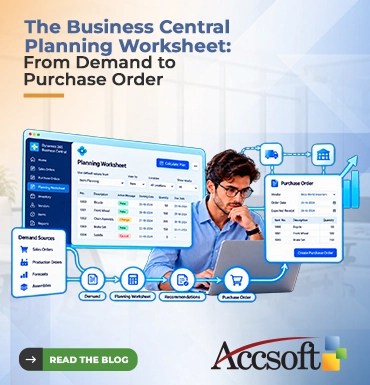
Manual procurement is akin to getting through a maze with a blindfold. You try to plan and manage through spreadsheets, memory, and ad hoc scrambling to make sure that there is adequate stock for your sales orders and production requirements. Over-procure, and you end up locking down valuable working capital in excess inventory. Under-procure, and you put yourself at risk of stockout situations, delayed production, and disgruntled customers. The Microsoft Dynamics 365 Business Central provides an all-in-one solution to this dilemma through the Planning Worksheet. The Planning Worksheet functions as the nerve canter for supply chain management. It bridges the gap between demand and supply through automation. It takes away the manual calculations required to determine reorder points for your inventory. The Planning Worksheet analyses inventory, planned demand, and replenishment to provide you with suggestions that will help you get from sales order straight into a Purchase Order. Here’s how the Business Central Planning Worksheet does its magic throughout the procurement process. Step 1: Identifying the Demand To make the Planning Worksheet effective, it must first understand the demand that it has to manage. In Business Central, demand can come from many places. One example is the Sales Order: you have a customer requesting the purchase of 50 widgets. But there are more forms of demand, such as the components needed for the production of widgets, forecasts based on history, and assemblies of items. Moreover, the system takes into consideration your defined inventory management parameters such as the safety stock levels and reorder point levels set on the item card. Step 2: Calculation of the Plan When demand is identified, it is now time for the calculation. Inside the Planning Worksheet, there is an option to calculate the “Plan.” Here Business Central uses its algorithm to analyse the total demand and compare it to the current inventory and incoming shipments (purchase orders or production). After analysing these numbers and planning parameter settings (reorder quantities, lead times, and order modifiers), the results will appear. And they aren’t just numbers but an Action Message that gives you the instructions about what you need to do to meet demand: New: You need to place a new purchase order. Change: You need to change an existing purchase order. Cancel: You no longer have a demand for an existing order. That is how Business Central avoids double orders, and your supply chain is perfectly matched with the real demand. Step 3: Evaluation and Fine-Tuning The Planning Worksheet, though highly intelligent, still gives control over to the user. Before the generation of any purchase orders, the supply chain managers could evaluate the recommended lines. The user can filter on vendors, locations, or products to get a better perspective of the big picture. If there are some recommendations that do not seem right, such as where you know that there is no product from the vendor in stock and you have to go somewhere else, or you choose to manually create groups for volume discounts, then you can easily modify, delete, or combine the recommended lines. Step 4: Carrying out the Purchase Order Once you are satisfied with the recommendations, all that remains is the execution stage. All you will need to do at this stage is just click on the “Carry Out Action Message” button and Business Central will automatically create the purchase orders for you. The system smartly groups the items according to their vendors depending on your vendor catalogues and the purchasing setup. It also automatically applies lead times, shipping methods and pricing agreements depending on your vendor. Within seconds, your raw demands have been converted to purchase orders. Conclusion From raw demand to purchase order does not have to be a disorganized and time-consuming task. The Business Central planning worksheet changes procurement into a well-organized proactive approach. By simplifying complicated calculations, recommending action messages and generating purchase orders, it helps you to buy just what you need and when you need it.