How Item Availability by Event Helps Prevent Unnecessary Purchasing
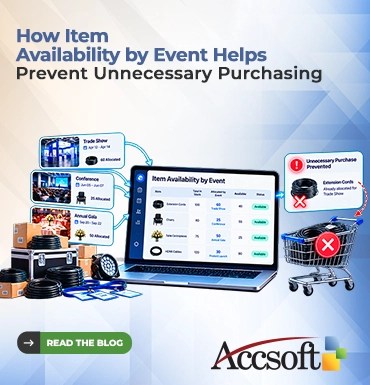
Every company has experienced the frustration of having an overstuffed storeroom. You purchase supplies “just in case,” only to discover at the end of the month that you already have everything you need sitting in the storeroom somewhere else. This unnecessary expense wastes money, takes up much-needed space in the warehouse, and hampers much-needed cash flow. The answer for companies that coordinate multiple projects, conventions, and/or seasonal assignments is to make better use of their inventory system. The system that will focus on event-level inventory management. Here’s how an event-driven inventory system can save your organization from excessive buying. The Weakness in Conventional Inventory Management Conventional inventory management systems will let you know what items you have within the warehouse. These systems won’t tell you why items are there or where they will end up. This leaves a very dangerous gap in your process. Should two different departments be planning two different events. Each department may look at the inventory, realize that there is an inventory shortage for their own needs, and request new orders. This means that you end up ordering twice, wasting money on purchasing, and ending up with surplus inventory after the events. You will be ordering blindly since you will not know what has been ordered yet. What is “Item Availability by Event?” Monitoring item availability based on event moves away from monitoring overall item availability and moves toward monitoring item availability by individual events. This will allow planning teams and procurement teams to know which items have been allocated to specific events, which are available for allocation, and which ones are still required to meet the demands of a particular event. This means, instead of having a simple dashboard saying, “100 extension cords in stock,” the dashboard will say, “100 extension cords in stock: 60 have been allocated to the Summer Trade Show; 40 available for allocation.” This small change in perception makes all the difference in terms of purchases. Why It Helps Prevent Unnecessary Purchases 1. Avoids Double Orders Since everyone knows which items have been allocated and why, there is no point in making duplicate orders. If the marketing team plans to organize a trade show and needs HDMI cables, they can check whether the IT department has not ordered the same cables in anticipation of their own product launch later this week. 2. Encourages Repurposing of Items Between Events Most items purchased for one event are likely to continue being useful even after the event itself. Using item availability by event, it becomes much easier to identify the “post event surplus” of items that can be instantly reused for future events. Once the annual gala was organized using 50 table centrepieces, this system allows to note them as available after that event. This way, the next month the team organizing an awards banquet can order them, which saves a lot on purchasing new decorations. 3. Avoids “Just in Case” Overbuying Event organizers are extremely cautious people for a valid reason; there cannot be any shortages during the event. Nevertheless, if they lack the ability to see what resources are at their disposal, they overbuy out of precaution. Item availability by event provides the necessary confidence and information that will allow you not to do this anymore. 4. Enhances Demand Forecasting With time, recording items through events provides a wealth of historical data. You understand precisely how many lanyards, custom folders, or lighting fittings a normal conference use. This accuracy will prevent over-ordering in the future because you will be making orders based on the actual historical data of that event and not mere guesses. The Bottom Line Redundant purchasing is not only a nuisance; it is a costly mistake that drains your business profits and efficiency. By using a purchase management method or an event-driven inventory system that records item availability through events, your company can overcome the habit of redundant purchasing. With such detailed data, companies can easily share resources, prevent duplicate orders, and rely on historical data when making orders.