Business Central Reservation vs. Item Tracking: What’s the Difference?
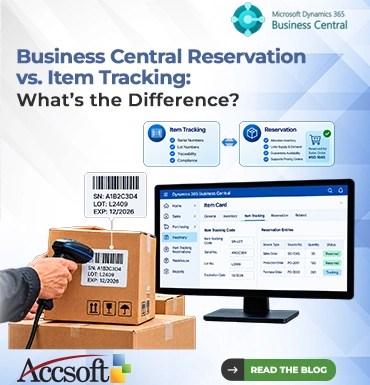
When managing inventories in the Microsoft Dynamics 365 Business Central, you must have come across “Item Tracking” and “Reservation.” As a beginner, they may appear to be two similar concepts, since they both relate to having the right item reach its destination at the right time. Treating them as one may result in inflexible procedures, delays in fulfilling the order or compliance issues. So, what is the difference? It is simple; Item Tracking is about identifying while Reservation is about allocating. Now let us understand their operations and what could happen when you get them mixed up. What Is Item Tracking? In Dynamics 365 Business Central, the concept of item tracking is what enables your organization to assign an individual identity to its inventory. Item Tracking works with Serial Numbers (individually assigned per item) and Lot Numbers (per batch) to enable tracking of the real-life history of a product. Essentially, think about Item Tracking as the “passport” of your item. Should your organization sell medical equipment, electronic goods, or perishable foods, it needs to know for sure which item went to which customer. Should a product recall take place, you must identify the item instantly. However, it should be noted that Item Tracking itself does not mean assignment of a specific item to a specific customer. The key point is that it enables you to track all the history of an item when it left your warehouse, how long it stayed there, expiration date, or warranty start date. Without item tracking, your computer is just a computer. With item tracking, you know its serial number and, thus, owner. What is Reservation? Reservation, on the contrary, is a rigid connection between supply and demand. It is a commitment. Once you generate a Sales Order and make a reservation for an inventory, you are telling Business Central, “Reserve 50 units of Item A exclusively for this customer.” Reservation is a strong allocation technique to cater to VIP customers or to satisfy any production order. It ensures availability during the picking phase, irrespective of all other incoming orders in the warehouse. You can make reservations for available inventories as well as for expected supply such as Purchase Orders. In case your key client demands a huge quantity of products for the next month, making a reservation will ensure that regular walk-in customers do not reduce that inventory. Working Together Now here comes the fun part: Item Tracking and Reservation do not exclude each other. Quite often, the two go hand in hand. You can reserve a particular tracked item. If, for example, you need to deliver “Lot B” of a certain pharmaceutical product owing to its unique expiration date, then Item Tracking will help to find Lot B and Reservation to reserve it from any other order. But if you employ Item Tracking without Reservation, the system will allocate your lot to another customer who completes the transaction faster. It is one of the frequent mistakes made by people, who confuse Item Tracking with Reserving. An item, although being tracked, does not have to be reserved, otherwise some other order will be able to take it. On the other hand, you may want to reserve any untracked items just for the sake of ensuring their availability, not specifying which one exactly. Conclusion Proper use of each function is essential in having an effective supply chain. Apply Item Tracking when there is a need for compliance, traceability, and warranty management. Apply Reservation when there is a need to ensure that there are enough for certain requirements, prioritize priority customers, and secure inventory for a production batch. Avoid reserving all your stock because it will restrict your ability to manage other clients’ orders. Similarly, avoid applying item tracking on simple and low-value inventory that only requires additional data entry. Remember that Item Tracking is the “what” and Reservation is the “who.”